PlantIn Plant Identifier, Care
- 4.0
- Rating
- 10.00M
- Installs
- Free
- Price

 Analysis by App-foxy
I found PlantIn Plant Identifier, Care most useful when I treated it as a practical starting point rather than an unquestionable plant expert. The app is aimed at people who want help identifying a plant, understanding a visible problem, or building better care habits without searching through several gardening sites. My first impression was that it makes an intimidating question—“What is wrong with this plant?”—feel easier to approach because the process begins with a photo and a plain-language goal.
That simplicity is the main reason I would recommend trying it. You do not need to know botanical terms before opening it, and you can use it for a houseplant, a flower, or a tree. At the same time, a camera-based result should be treated as guidance, not a final diagnosis. Lighting, the angle of the leaf, and the condition of the specimen all affect what the app can make of an image.
What to expect from PlantIn
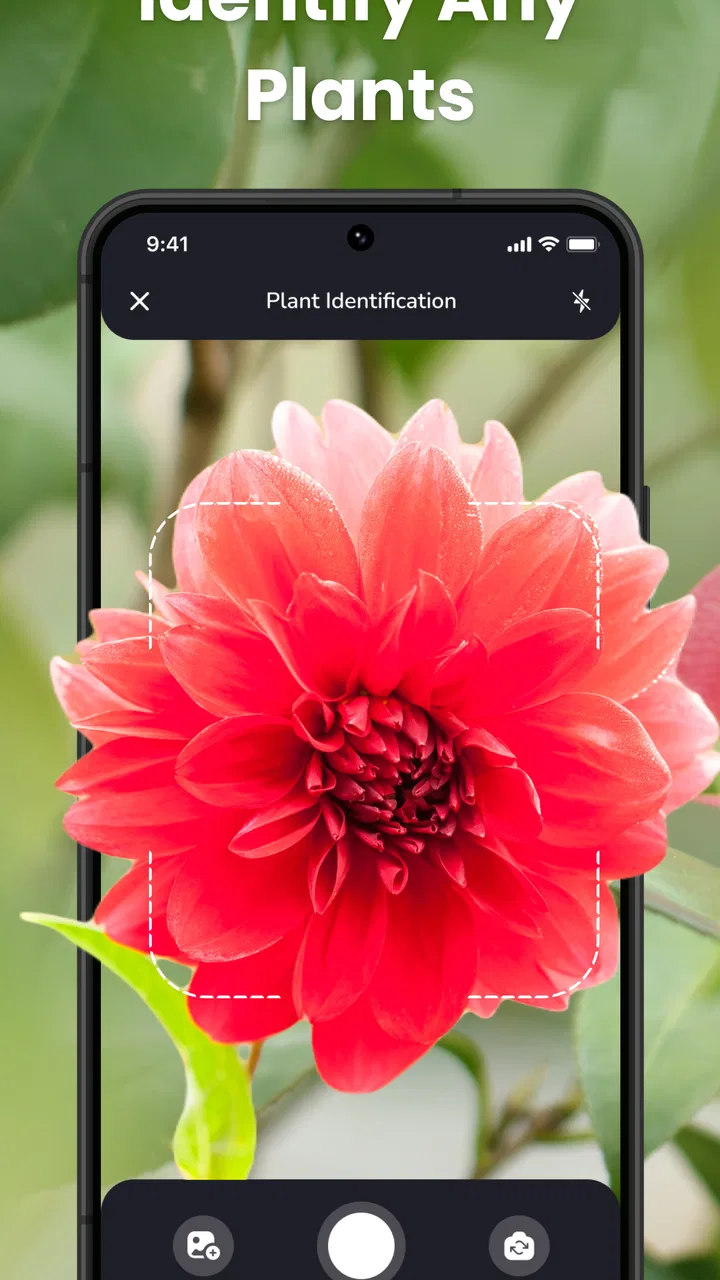
PlantIn is an education app from PlantIn, available free to install with optional purchases. Its purpose is broader than simply naming a plant. In everyday use, I see it as three tools brought together: visual identification, help with possible plant diseases, and care-oriented information that can help you decide what to check next.
You May Also Like

 Blood Strike: 2.5 Anniversary
Blood Strike’s Loadouts Turn Every Drop Into a Tactical Gamble
A close look at Blood Strike’s custom loadouts: how fast access to signature weapons reshapes its battle royale rhythm, rewards preparation, and narrows the gap between fights.

 Pandora - Music & Podcasts
Pandora’s Music Is Easy to Start, but Harder to Recover
Pandora’s strength is its low-effort path from a seed to a station. Its weak spot is how much confidence it asks you to place in connection, setup, and quiet recovery.

 8 Ball Pool
 Is Built on Rivalries, Rematches, and Routine
A close look at the rivalries, rematches, shared routines, and unanswered safety questions that turn a quick pool match into a persistent mobile community.

 Samsung Music
’s Quiet Strength Is Playing What You Already Own
Its reach comes less from spectacle than from dependable access to a personal library. That simplicity is both the app’s strongest retention engine and its ceiling.

 AccuWeather: Weather Radar
AccuWeather Review: A Quick, Clear Forecast for Everyday Decisions
For everyday plans, the best forecast is the one you can understand quickly. AccuWeather makes rain timing, radar, and local conditions easy to act on, with a few trade-offs.

 Hill Climb Racing
Why Hill Climb Racing Still Turns Crashes Into One More Run
A tiny car, a bumpy hill and one more upgrade: Hill Climb Racing keeps resurfacing because its simple chaos makes every near-miss feel personal.
More From Our News Desk



The app has been available since March 17, 2021, and its current Android version is 2.70.0. It works on Android 7.0 and later, which makes it accessible on many older devices as well as newer phones. The store age rating is Mature 17+, something families should notice before handing the app to a child.
Its popularity is substantial, with over ten million installs. The average rating sits at 4.0 from around 135 thousand ratings, supported by roughly 8.5 thousand written reviews. I would read that as a sign of broad usefulness rather than proof that every identification or diagnosis will be correct. Plant care is full of context, and a single photograph cannot always show the cause of a problem.
The free entry point is helpful for a first test, but the app also includes in-app purchases ranging from $0.99 to $199.99 per item. That is a wide range, so I would pay attention to each screen before confirming anything. If you only want to identify one plant occasionally, you should first see how far the free experience takes you instead of assuming every feature is included.
What I would not expect is a replacement for a nursery professional, a plant pathology reference, or a carefully maintained personal growing journal. PlantIn is better at reducing the first wave of uncertainty. It can help you move from “I have no idea what this is” to “I know what details to investigate,” which is often the most useful step for a beginner.
Why the photo matters more than the question
The quality of your input has a bigger effect than many new users realize. A distant photo of an entire plant may show its shape but hide the details needed for identification. A close image of one damaged leaf may reveal spots or discoloration but remove the context that distinguishes sun stress from watering trouble.
I get better results by taking more than one kind of picture outside the app first: one showing the whole plant, one showing the leaf pattern, and one showing the affected area. Even if the app asks for only one image at a time, those extra views give me a way to compare its response with what I can see myself. Clean lenses, natural light, and a steady hand are small improvements that make the process less frustrating.
The most useful habit is to photograph evidence, not just the plant. Include the leaf edges, stems, soil surface, and overall posture when those details relate to the problem. A wilted plant and a plant with a leaf disease can look similar from far away, but their visible clues are not the same.
Getting through the first setup
After installing PlantIn, I would begin with a simple plant that has clear leaves and a recognizable shape. Do not make your first test the sickest plant in your home or a specimen with several problems at once. A straightforward example lets you learn the app’s flow without wondering whether a confusing result came from the app or from a difficult subject.
Keep the phone close enough to capture leaf texture while leaving enough of the plant visible to provide context. Avoid harsh reflections from windows and avoid placing a small leaf against a busy background. If the plant is moving, wait for a still moment rather than repeatedly tapping the shutter and hoping one image works.
When the app asks you to make a choice about the task, think about your actual goal. If you want a name, focus on identification. If you are worried about spots, curling, or discoloration, use the disease or problem-oriented route instead of expecting a name alone to explain the symptoms. This distinction matters because knowing a species and understanding a symptom are related but different jobs.
I also recommend keeping the first session focused. Do not immediately scan every plant in the room. Start with one specimen, read the result carefully, and compare it with the physical plant in front of you. A calm first session makes it easier to notice whether the suggested care information is relevant to your light, watering, and environment.
How to avoid a misleading first image
There is a useful trade-off between a beautiful photograph and a useful diagnostic photograph. A decorative image taken from across the room may look good but provide little detail. A less attractive close-up, taken in even light, is usually more valuable for spotting texture, lesions, pests, or changes in color.
For a plant with a suspected issue, I would take the picture before removing damaged leaves. The damaged tissue is part of the evidence. I would also avoid watering, misting, or moving the plant immediately before documenting it, because a wet surface or a sudden change in position can make the condition harder to judge later.
One practical workflow is to label the plant in your own notes with the date and location, then use PlantIn to examine it. This is not about creating a complicated gardening system. It simply prevents a common mistake: forgetting what the plant looked like before you changed three things at once. If the condition improves, you will have a better idea of which action helped.
The first meaningful success
For a first-time user, success is not merely seeing a plant name on the screen. A meaningful result should give you a plausible identification or a useful direction for investigating a symptom, followed by a sensible next action. For example, identifying a houseplant can help you search for the right light and watering expectations, while recognizing a possible problem can encourage you to inspect the leaves, soil, and surrounding conditions more carefully.
Once PlantIn returns a result, I would pause before acting. Compare the suggested plant with visible features such as leaf arrangement, shape, color, and growth pattern. If the result looks wrong, retake the image instead of forcing your care routine to match it. A wrong identity can lead to wrong assumptions about light, watering, or acceptable leaf changes.
With disease diagnosis, I would treat the result as a shortlist of possibilities. Look for agreement between the suggested issue and what you can actually observe. Are the marks limited to older leaves? Is the soil staying wet? Is the plant pressed against a cold window or receiving strong direct sun? The app can point your attention in a direction, but your home environment supplies the missing context.
This is where PlantIn feels more valuable than a basic image search. A search engine may return many visually similar pages, leaving a beginner to decide which one applies. The app gives the investigation a narrower starting point. That does not make it infallible, but it can reduce the time spent scrolling through unrelated results.
A realistic everyday example
Imagine noticing yellowing leaves on a plant beside your desk. Instead of immediately adding fertilizer, I would photograph the whole plant and then the yellow leaves in good light. After checking the app’s response, I would inspect whether the soil is still damp, whether the newest growth looks healthy, and whether the window exposes the plant to strong afternoon sun.
If the app suggests a possible disease, I would not spray the plant immediately. I would first separate observation from treatment: confirm whether the marks spread, check nearby plants, and remove only leaves that are clearly beyond recovery if that fits the care advice I trust. The app is most helpful here as a prompt for a structured check, not as permission to apply a random remedy.
That workflow also protects your other plants. A rushed diagnosis can lead to unnecessary chemicals, overwatering, or moving a plant into a worse location. Using the app to slow down the decision is one of its less obvious benefits.
Common confusion and where the app needs judgment
The biggest source of confusion is the difference between identification and diagnosis. A plant may be correctly identified while the explanation for its damaged leaf remains uncertain. Conversely, a visible symptom may be recognized without the species being completely clear. I would keep those questions separate and avoid treating one successful result as proof of the other.
Another issue is that symptoms overlap. Yellow leaves can be connected to watering, light, age, roots, pests, or disease. Brown edges can have several causes. A camera cannot measure everything that matters below the soil or inside the growing environment. If the suggested explanation does not fit what you observe, trust the mismatch and gather better evidence.
PlantIn is also not the best choice for someone who wants a fully manual reference library with complete control over every botanical detail. A traditional plant book or a specialist forum may be better when you need deep species comparison, regional growing advice, or discussion with experienced growers. The app wins on convenience and immediacy, while those alternatives can offer more nuance.
Users who dislike subscriptions or optional purchase prompts should approach the app carefully. The free label makes it easy to begin, but the presence of paid items means you should read the wording on any offer before continuing. I would not install it expecting unlimited access to every possible tool without checking the current in-app flow for yourself.
There is also a privacy-minded practical point: photographing a plant near your home can accidentally include personal surroundings. Before capturing an image, I would frame the shot tightly enough to show the plant while excluding documents, faces, addresses, or other private details. This is a sensible habit for any camera-based app.
When another option is better
If you have a rare plant and the cost of a mistake is high, I would combine PlantIn with advice from a specialist grower or nursery. The same applies when a plant is rapidly declining, when several plants show symptoms at once, or when you suspect a serious pest outbreak. In those cases, a fast app result may be useful, but it should not be your only source of guidance.
If your main goal is reminders and routine tracking rather than identification, a dedicated plant-care organizer may suit you better. If your main goal is learning botany in depth, a field guide or educational course may provide stronger explanations. PlantIn is most convincing for the person who wants a quick visual starting point and enough care context to decide what to examine next.
Turning one scan into better plant care
After the first successful identification, I would use the result as a baseline rather than stopping there. Note where the plant sits, how much light it receives, and how quickly its soil dries. Then revisit the plant when something changes. This makes the app more useful over time because each new scan is compared with your own observations instead of being treated as an isolated answer.
A second smart use is checking a plant before buying it. If you see an unfamiliar specimen at a market or garden center, a quick identification can help you decide whether its general needs match your home. I would still confirm the result before purchasing, especially if the plant’s toxicity, light requirements, or mature size matters to your household.
You can also use it to improve conversations with another person. Instead of saying “my plant looks bad,” you can share the plant’s likely identity, describe the exact visible symptom, and explain where it is growing. That makes advice from a friend, nursery, or gardening community more precise, even when PlantIn is only the first step.
For repeated problems, consistency matters more than constant scanning. Photograph the same side of the plant from a similar distance, record major changes, and avoid changing watering, light, soil, and fertilizer all at once. This is an advanced but simple principle: if you change everything together, you learn nothing about the cause.
I would also be cautious with confident-looking care instructions. A recommendation that is sensible for a healthy plant may be unsuitable for a stressed one. Read the advice in relation to the current condition. A plant with damaged roots, for instance, may not respond well to the same watering routine you would use for vigorous new growth.
Who will get the most from it
PlantIn is a good match for a beginner with several unidentified plants, a busy person who wants quick guidance, or a houseplant owner who struggles to describe symptoms in search terms. It is also useful for curious learners who enjoy connecting a visual result with basic care research.
I would be more hesitant to recommend it as the sole tool for professional growers, collectors managing unusual species, or anyone facing an urgent and severe plant-health problem. Those users need more environmental detail and often benefit from human expertise. The app can still assist with initial identification, but its role should remain limited.
The Mature 17+ rating is another reason to consider the intended user before installing it for a younger family member. The app belongs on an adult’s device or under appropriate supervision when age restrictions matter.
Overall, I like PlantIn because it gives a first-time plant owner a clear path: take a better photo, ask the right kind of question, inspect the result, and make one measured change. It does not remove the need to observe your plants, and it should not replace expert help in difficult cases. But for everyday identification and early problem-solving, it is a convenient companion.
My recommendation is to start with the free experience, use a healthy plant for the first test, and avoid rushing into paid options until you understand what you actually need. If you approach every result as a helpful lead rather than a guaranteed verdict, PlantIn can turn plant care from guesswork into a more organized habit.
FAQs for PlantIn Plant Identifier, Care
01What is PlantIn Plant Identifier, Care, and what can it do?
PlantIn Plant Identifier, Care is a mobile gardening assistant designed to help users recognize plants from photos and learn how to care for them. After taking or uploading an image, the app can suggest a plant name and provide care guidance related to watering, light, soil, and general maintenance. It is useful for beginners, houseplant owners, and anyone curious about an unfamiliar plant.
02How accurate is the plant identification feature?
The identification tool can be helpful for common houseplants, garden plants, and many recognizable species, especially when the photo is clear and shows leaves, flowers, or other distinctive details. However, results should not be treated as guaranteed botanical identification. Similar-looking species, poor lighting, damaged leaves, and unusual varieties may lead to incorrect suggestions, so users should verify important information before acting.
03Does PlantIn provide personalized plant care reminders?
PlantIn is designed to make plant care easier by allowing users to keep track of their plants and receive guidance or reminders for routine tasks such as watering. The usefulness of these recommendations depends on the plant, pot size, soil, climate, and indoor conditions. Treat reminders as helpful starting points rather than fixed instructions, and always check the soil and plant’s condition before watering.
04Is PlantIn Plant Identifier, Care free to download and use?
The app may be available to download for free, but some features, detailed care content, consultations, or advanced tools can require a subscription or in-app purchase. Before confirming a trial or subscription, review the pricing, renewal terms, and cancellation process shown in the app store. Availability and costs may also vary depending on your country, device, and the current version of the application.
05Can PlantIn help diagnose sick or damaged plants?
PlantIn can be useful when you want to investigate visible problems such as yellow leaves, spots, wilting, or pest-related damage. By combining a photo with information about the plant and its growing conditions, the app may suggest possible causes and care steps. Nevertheless, photo-based advice is not a substitute for an expert diagnosis, particularly when the plant is valuable, severely affected, or potentially exposed to disease.
Pros
- Identifies many common houseplants from a quick photo.
- Care reminders help users stay consistent with watering routines.
- Plant library offers useful guidance for beginners.
- Diagnosis tools can highlight possible plant health problems.
- Clean interface makes plant profiles easy to browse.
Cons
- Some identification and care features require a paid subscription.
- Photo results may be inaccurate with poor lighting or damaged leaves.
- Watering advice may not suit every home’s climate or soil mix.
- The app can send frequent notifications if reminders are not adjusted.
- Advanced plant information may feel limited for experienced growers.

PlantIn Plant Identifier, Care
Gallery